AskBob - Why You Need a Hybrid Backup (and something I forgot...)
Published: Thu, 04/16/15
Some people have asked me, "Why should I do BOTH local and online backups?" Here's why... Online backup allows you to access your most important files from anywhere, and offers redundancy (backup for your backup). Local backup is a complementary solution, and solves the biggest problem with cloud backup – slow backups and restores. With local backup, you can backup EVERYTHING, and restore your data really fast! That's the hybrid approach.
IDrive WiFi: Hybrid Backup Made Simple
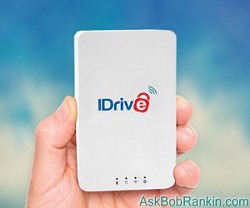
I have the IDrive WiFi and use it every day to make backups for my PCs and smartphone. In addition to the convenience of automated wireless backups, and the hybrid local/cloud backup capability, here are some additional IDrive features you should know about:
- INCLUDE/EXCLUDE - IDrive automatically selects which files to include in your backup. But you can customize the list of folders to backup, or exclude certain files and folders from being backed up. This lets you fine tune both local and cloud backups.
- DISK IMAGE - With this feature, you can create an "image backup" -- a single file that includes the operating system, settings, programs, files, and folders with contents and information structure intact. If you have a hard drive failure, you can use the disk image to quickly restore everything, just the way it was.
- VERSIONING - IDrive maintains up to 10 previous versions of all the files in your account. To restore previous versions of any file, click the Restore tab, right-click the desired file and select "View previous versions"
- CONTINUOUS DATA PROTECTION - This feature automatically detects any changes to files present in your backup-set and backs them up in real-time. Handy if you accidentally save unwanted changes to a file. (Cloud only)
Have you been putting off backups because you don't have an external hard drive? Order your IDrive Wi-Fi drive today, during this 3-day sale. You'll get it for just $59.50, instead of the regular price of $100. Similar 1-terabyte external drives with wireless capability cost $150 or more. And the IDrive WiFi comes with one free year of IDrive cloud backup, too.
Safety, Security and Invisibility
So what about the safety and security of cloud backups? IDrive uses strong encryption when storing your data in the cloud, but still, some people worry. That's another reason why a local backup with an external hard drive is an excellent choice. The backup drive is in your home or office, and under your protection.
That brings me to the point that I forgot to mention in yesterday's newsletter. It's something so obvious, I didn't think to mention it at first. One of my concerns when backing up locally is that a thief could easily steal my external backup drive, tethered, as it is, to my computer by a telltale USB cable. It might be even more tempting (and certainly easier to steal) than the computer itself!
But because the IDrive Wi-Fi drive can connect wirelessly, it would make the burglar's work more difficult. You can place your IDrive Wi-Fi in a closet, a cupboard, or any out-of-the-way spot with access to an electrical outlet and Wi-Fi coverage. And presto, it becomes "invisible" to intruders, while still remaining connected to your PC, Mac and mobile devices for automatic backups.
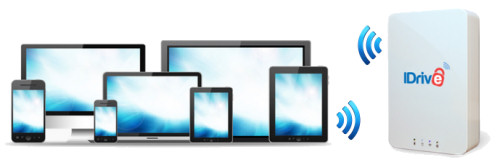
As I mentioned yesterday, I don't know of ANY other backup solution that combines local and cloud storage like this. Nor is there one that seamlessly integrates mobile and social media backup, while allowing you to backup UNLIMITED devices. (Carbonite and Mozy charge extra if you have more than one computer.)
With IDrive and the IDrive Wi-Fi, all the bases are covered. Your PCs, Macs, mobile gadgets and social media accounts are securely backed up, painlessly and automatically.
Regards,
Bob
P.S. -- I encourage you to order your IDRIVE WI-FI now, because this exclusive offer expires on Friday April 17th at midnight. The IDrive Wi-Fi normally costs $100. AskBob readers get it for just $59.50. CLICK HERE to order your IDRIVE WI-FI.
P.P.S. -- Do you have a friend or relative who isn't doing regular backups? Forward this message to them, and they'll thank you.